
Draftly AI Post Optimizer for WordPress, in beta
The AI post optimizer for WordPress
Draftly AI Post Optimizer is the AI plugin for WordPress that fixes the posts you already have. Your SEO plugin scores your posts. Draftly rewrites the weak sentences in your voice, and you approve every change.
Version 1.1.0. Works with Yoast SEO, Rank Math and All in One SEO.
How the plugin works
Three steps, all inside wp-admin. The screenshots are the plugin running on Roof Repair Blog, an example test site.
Step 1
Connect your site
In WordPress, go to Plugins, Add New, Upload Plugin and choose the zip you downloaded, then Activate. Open Draftly > Connection, click Connect to Draftly and approve the site in your free Draftly account. No WordPress password or application password changes hands.
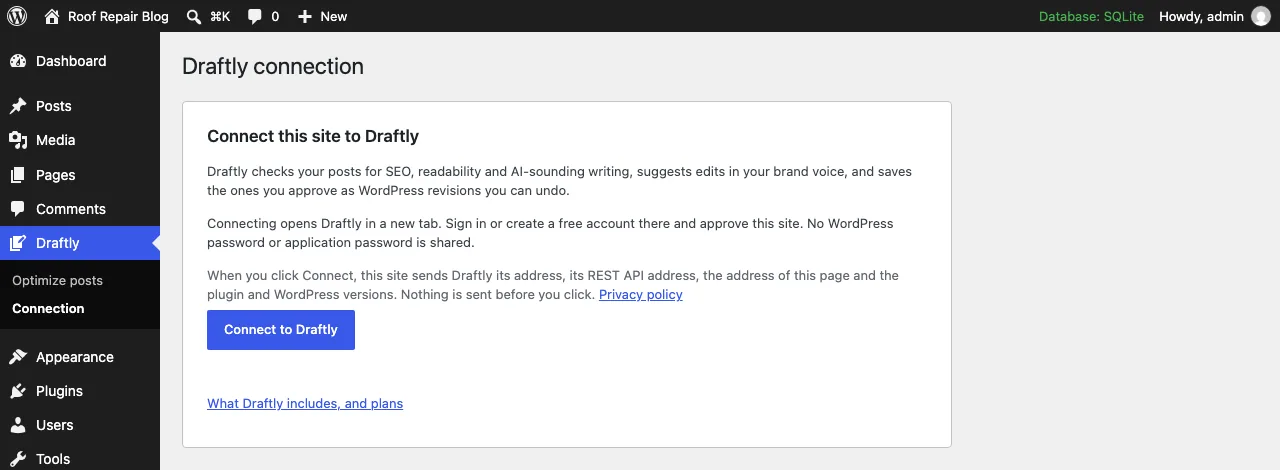
Connect from Draftly > Connection. No WordPress or application password changes hands. Shown on Roof Repair Blog, an example test site. Step 2
Check a post, then review each edit
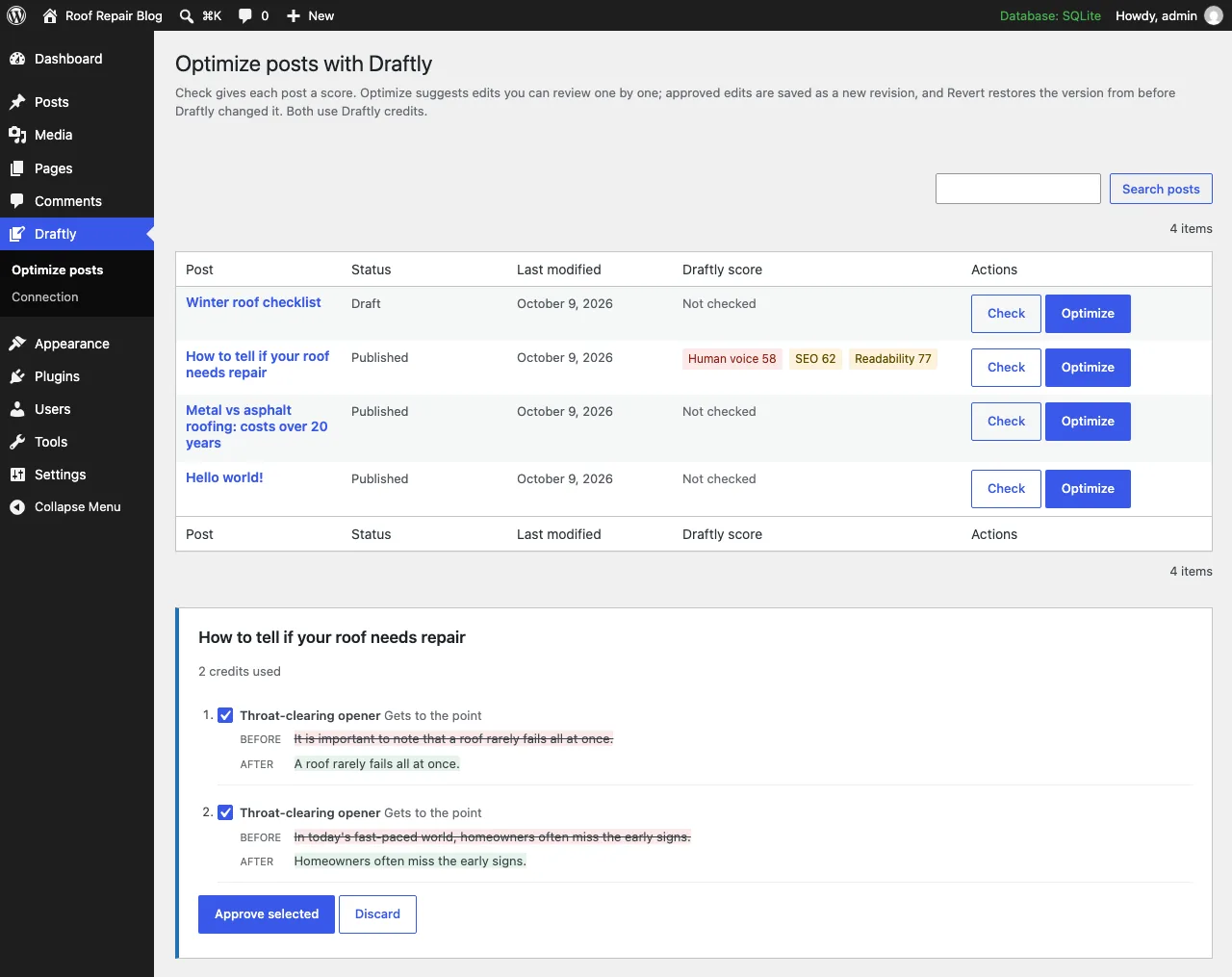
Check scores a post for human voice and readability. Optimize suggests edits in your brand voice, each one shown as the sentence before and after. Untick anything you don't like.
Each suggested edit shows the sentence before and after. Tick the ones you want and approve. Example test site. Step 3
Approve it as a revision, revert any time
Approved edits are saved as a normal WordPress revision. Changed your mind? Revert restores the version from before Draftly touched the post, SEO title and description included.
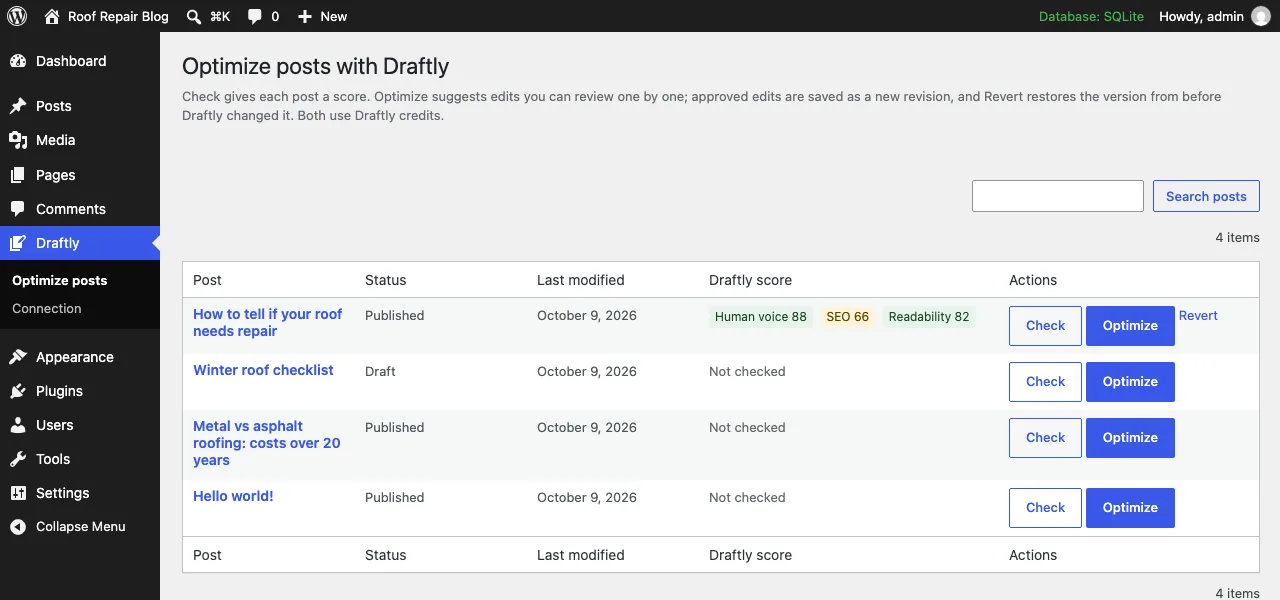
After approval: new scores, a new WordPress revision and a Revert link. Example test site. 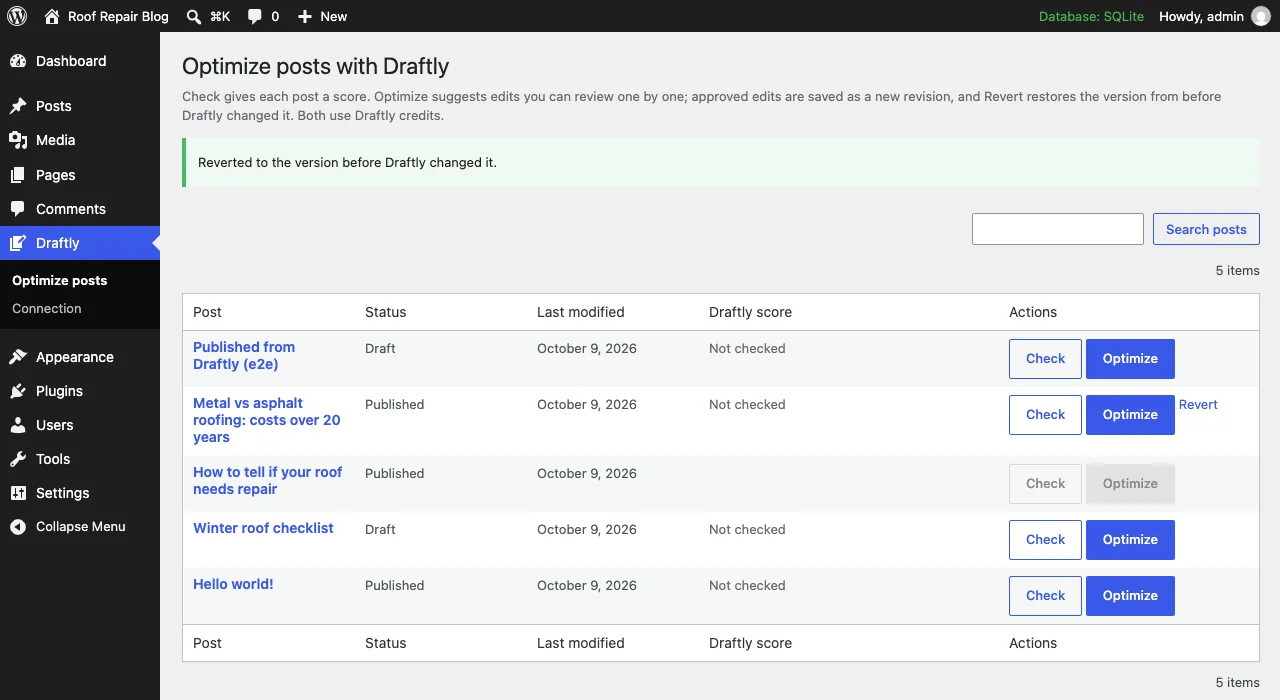
Revert puts the post back the way it was before Draftly touched it. Example test site.
What it fixes on posts you already have
Most WordPress AI plugins are built to write new posts. Draftly works as an AI content editor for the ones already on your site, the posts that used to rank and the drafts that read like a chatbot wrote them.
Writing that sounds machine-made
Throat-clearing openers, filler phrases and stiff transitions get flagged, then rewritten in your voice. Each post gets a 0 to 100 human-voice score.
Hard-to-read sentences
The readability score flags hard-to-read passages, and Optimize suggests plainer versions. You see the new score after you approve.
Old posts nobody has time for
Turn on auto mode and Draftly works through your published posts a few at a time, at Safe or Full. Every change is a revision you can revert.
Missing meta titles and descriptions
Auto mode fills them in Yoast SEO, Rank Math or All in One SEO, so they show up where you already edit them.
Bulk meta for the whole siteComing soon
Generate missing or weak meta titles and descriptions for many posts at once, with the same review step.
Internal linksComing soon
Link suggestions drawn from your own pages, so old posts point readers to the newer ones.
De-AI your own draftsComing soon
Paste a draft you wrote with AI help and get it back reading like you wrote it. It already runs in the Draftly web editor; the button inside the plugin is next.
Image alt textComing soon
Descriptive alt text for the images in your posts, on the Grow plan.
Works with Yoast, Rank Math and AIOSEO
Keep the SEO plugin you have. Draftly reads and writes meta titles and descriptions in the same fields it uses, so they show up in its snippet preview like any title you typed yourself.
Think of it as the AI SEO plugin for WordPress that sits on top: your SEO plugin flags the problem, Draftly writes the fix, and you approve it.
| Your SEO plugin | Where Draftly writes the meta |
|---|---|
| Yoast SEO | The SEO title and meta description fields in the Yoast box on each post |
| Rank Math | The title and description in Rank Math's snippet editor on each post |
| All in One SEO | AIOSEO's title and description for each post (version 4 or later) |
| No SEO plugin | The post excerpt is used as the description |
WordPress plugin plans
Every plan gets the same plugin. Plans set how much you can use each month. Billed by Draftly through Stripe.
Free
$0/month
Free with the plugin
Try every part of the plugin on your own posts.
- Post optimizations: 5 posts
- Bulk meta titles and descriptions: 3Coming soon
- Internal-link suggestions from your own pages: not included
- De-AI your own writing: 500-word sampleComing soon
- Alt text for images: not included
Optimize
$4/month
$48 billed once a year
Clean up old posts and their meta, a few a day.
- Post optimizations: 30 a month
- Bulk meta titles and descriptions: 200 a monthComing soon
- Internal-link suggestions from your own pages: IncludedComing soon
- De-AI your own writing: not included
- Alt text for images: not included
De-AI
$8/month
$96 billed once a year
Everything in Optimize, plus rewrites of your own drafts so they read like you.
- Post optimizations: 30 a month
- Bulk meta titles and descriptions: 200 a monthComing soon
- Internal-link suggestions from your own pages: IncludedComing soon
- De-AI your own writing: 50,000 words a monthComing soon
- Alt text for images: not included
Grow
$12/month
$144 billed once a year
The whole site: more optimizations, all your meta and image alt text.
- Post optimizations: 60 a month
- Bulk meta titles and descriptions: Whole site, up to 1,000 a monthComing soon
- Internal-link suggestions from your own pages: IncludedComing soon
- De-AI your own writing: 100,000 words a monthComing soon
- Alt text for images: 300 images a monthComing soon
Credit top-ups are $5 for 1,500 credits or $10 for 3,000 credits, on any account, free ones included.
Coming soon marks features in your plan that aren't in the plugin yet. Version 1.1.0 does Check, Optimize with review and approval, Revert, auto mode, and SEO titles and descriptions in Yoast SEO, Rank Math and All in One SEO. De-AI already runs in the Draftly web editor.
Want Draftly to write new posts as well? Topic ideas from your industry's news, AI images and autopilot publishing are on the main Draftly plans, from $29 a month.
Draftly vs. Rank Math, Yoast, AIOSEO and GetGenie
If you want one plugin that runs your whole SEO setup, with AI meta in bulk, get Rank Math or Yoast. If you mostly want AI to write new posts, GetGenie and AIOSEO's AI credits are built for that.
Pick Draftly when the posts you already have need fixing. It edits them sentence by sentence in your voice, shows every edit before and after, and saves it as a revision you can revert. It runs next to the SEO plugin you have, and $48 a year is the lowest entry price here. The SEO plugins do a lot more than AI for that money, though.
| Feature | This pluginDraftlyAI Post Optimizer | Rank MathContent AI (Rank Math AI) | Yoast SEO PremiumAI features | All in One SEOAIOSEO AI features | GetGenieAI writing plugin |
|---|---|---|---|---|---|
| Free use | Up to 5 posts, no card | Limited monthly AI use with the free plugin | Free plugin has no AI writing | Free Lite plugin; AI runs on credits you buy | 2,500 AI words a month |
| Lowest paid price | $5/mo billed monthly $4/mo billed yearly ($48) | €5.99/mo billed yearly (€71.88)1 No monthly billing | $118.80 a year ($9.90/mo)1 No monthly billing | $49.50 first year, then $99 a year1 No monthly billing | $9.99/mo billed monthly $6/mo billed yearly ($72) |
| Fixes the posts you already have, sentence by sentence | Yes. Edits across the whole post | Partial Fixes failed SEO tests2 | Partial AI Optimize for 5 SEO checks2 | Not listed | Partial Rewrites text you paste in |
| Shows each edit before and after, for you to approve | Yes. Untick any edit you don't want | Yes. Approve, regenerate or reject | Yes. Apply or dismiss each suggestion | Partial Review AI text before inserting it | Not listed |
| Saves changes as a WordPress revision with one-click revert | Yes. Revert a post or a whole auto-mode run | Partial Past AI output kept in History3 | Not listed3 | Not listed3 | Not listed3 |
| Auto mode: fixes posts across your site on its own | Yes. Opt-in, Safe or Full, posts only, paid plans | Not listed | No. You approve every change | Not listed | Not listed |
| Flags AI-sounding writing | Yes. Human voice score, 0 to 100 | Not listed | Not listed | Not listed | Not listed |
| Writes in your brand voice | Partial Uses the voice Draftly saved for your site4 | Partial You pick a tone of voice | Not listed | Not listed | Partial You pick a tone |
| SEO titles and meta descriptions | Partial One post: fills missing ones in auto mode5 Bulk: Coming soon | Yes. One post Yes. Bulk: 100 a month on Starter | Yes. One post Yes. Bulk editor, you approve each | Yes. One post Yes. Bulk: AI Bulk Actions | Yes. One post: Meta Description template Bulk: Not listed |
| Works with your SEO plugin | Yes. Writes into Yoast SEO, Rank Math or AIOSEO | Is the SEO plugin | Is the SEO plugin | Is the SEO plugin | Not listed |
| Writes brand-new posts | On main Draftly plans, from $29/mo, not the plugin plans | Yes. 15 long-form articles a month on Starter | Partial Content Planner builds a starter draft | Yes. Blog drafts, paid with AI credits | Yes. One-click blog posts |
| How usage is counted | Posts a month (30 on Optimize), plus optional credit top-ups | Monthly limit for each AI feature | Yearly license; AI limits not listed | AI credits (10,000 with Basic) | AI words a month (20,000 on Starter) |
Scroll the table sideways to see every plugin.
- 1.Prices before tax, as each vendor listed them. Rank Math AI, which includes Content AI, is sold yearly in euros and renews at €6.99 a month. Yoast SEO Premium is billed yearly. AIOSEO's first-year price is an introductory rate, and its plans are yearly.
- 2.Rank Math's Fix with AI edits a post to pass 12 of Rank Math's SEO tests, such as keyword placement, content length and keyword density, and it also has a paragraph rewriter. Yoast AI Optimize covers five checks: keyphrase in introduction, keyphrase density, keyphrase distribution, paragraph length and sentence length.
- 3.Anything you save in the WordPress editor goes into WordPress's own revision history, whichever plugin you use. "Not listed" means the vendor doesn't describe a revert for its AI changes. Rank Math keeps past AI output under Content AI > History so you can copy it back.
- 4.Draftly uses the brand voice saved for your website in your Draftly account. It's learned from your site when you add the site in the Draftly app, and you can edit it there. A site first connected from the plugin starts with Draftly's default writing rules until you set a voice.
- 5.Auto mode fills a missing SEO title or description from the post's title and opening lines, in the fields your SEO plugin uses. It doesn't rewrite meta you already have. AI-written meta for many posts at once is coming soon to the plugin plans.
Compared on from each vendor's own pricing and feature pages. “Not listed” means we couldn't find the feature on those pages. Prices and features change, so check before you buy. Sources: Rank Math rankmath.com/ai/pricing, rankmath.com/content-ai, rankmath.com/kb/fix-seo-tests-with-content-ai; Yoast SEO Premium yoast.com/wordpress/plugins/seo, yoast.com/ai-features, yoast.com/help (AI Optimize), yoast.com/pricing; All in One SEO aioseo.com/pricing, aioseo.com/features/ai-content-generator; GetGenie getgenie.ai/pricing, getgenie.ai/template, getgenie.ai/template/content-rewriter. Draftly: plugin version 1.1.0 and the plans above.
Frequently asked questions
Does it publish without asking?
No. By default Optimize only suggests edits, and nothing on your site changes until you approve them. On a paid plan you can turn on auto mode, which applies edits to your posts by itself at the level you choose: Safe (writing-rule fixes, AI-sounding phrases, headings, missing SEO titles and descriptions) or Full (everything Optimize suggests). It works only on posts, never pages, and stays within your plan's monthly allowance. Every change, approved or automatic, is saved as a WordPress revision you can revert. A post reaches your site from Draftly only when you send it from the Draftly app yourself, or when you turn on scheduled publishing on Draftly's Autopilot plan.
Will it change my SEO plugin settings?
No. The plugin writes only the SEO title and meta description (and the focus keyword, when Draftly sends one) on posts you approve, in the fields Yoast SEO, Rank Math or All in One SEO already use. Sitemaps, schema, redirects and every other setting stay as they are. Revert puts the previous title and description back.
What data is sent to Draftly?
Nothing until an administrator clicks Connect to Draftly. Connecting sends your site address, REST API address, the Connection screen's address and the plugin and WordPress versions. When someone clicks Check or Optimize, that post's title, address and content are sent. Approving edits sends the post's current content and the approved edits. The Connection screen asks Draftly for your account email, plan and remaining credits, and disconnecting tells Draftly to revoke the site's key. The plugin collects no analytics or tracking data.
Is it in the WordPress plugin directory?
Not yet. The plugin is in beta and coming to the WordPress plugin directory. Create a free Draftly account to join the beta.
How do I undo a change?
Click Revert next to the post on Draftly > Optimize posts. It restores the version from just before Draftly's last change. The change is also in the post's normal revision history.
Does it need my WordPress password?
No. The connection uses a key that only your site and Draftly know, and every request is signed with it. Disconnect any time from Draftly > Connection or from your Draftly account.
Can it humanize AI content I wrote?
That is what De-AI is for. It rewrites a draft with Claude Sonnet 5.5 so it reads like you: plain sentences, your vocabulary, no filler. It runs in the Draftly web editor today and is coming to the plugin. It is built for your readers and makes no promise about AI detectors.
Can it write new posts too?
The plugin plans cover the posts you already have. Writing new posts, topic ideas from industry news, AI images and scheduled publishing are on Draftly's main plans, from $29 a month.
Draftly's Terms and Conditions and Privacy Policy apply to the data the plugin sends to Draftly.
Keep reading
- The AI copywriter for small-business blogsHow Draftly goes from your URL to a published post in your brand voice.
- SEO copywriting rules we check on every postStructure, voice and call-to-action rules, with before and after examples.
- Best AI for writing: 14 models testedWhich models write the most human-sounding posts, and what each one costs.
- SEO MCP server for Claude and ChatGPTBring your brand voice and live keyword data into the AI app you already use.
Try it on up to 5 posts free
Download the plugin, connect it to a free Draftly account and optimize up to 5 posts. No credit card.


